
Imagine effortlessly managing user roles and permissions within your organisation. With ARLAS-IAM, administrators can easily categorise users, ensuring precise control over data access. Gain peace of mind knowing that sensitive data remains secure while promoting seamless collaboration across teams and external stakeholders.
In our evolution of ARLAS, we have added user management functions with ARLAS Identity and Access management (IAM). ARLAS-IAM is fully entrenched in all ARLAS deployment; on-premises, or on ARLAS-Cloud, eliminating the need to connect multiple tools to a single service. Now, ARLAS users don’t need to link to third-party user management tools, unless they choose to do so.
When developing ARLAS-IAM we took three main aspects of data access management into account:
- Account Inventory: to oversee data access, application usage and irregularities like wrong login
- Compliance visibility: to ensure proper service and user provisioning. What can be accessed ? Is it the right level of access?
- Analytics and Automation: admin insights on user logs and password changes.
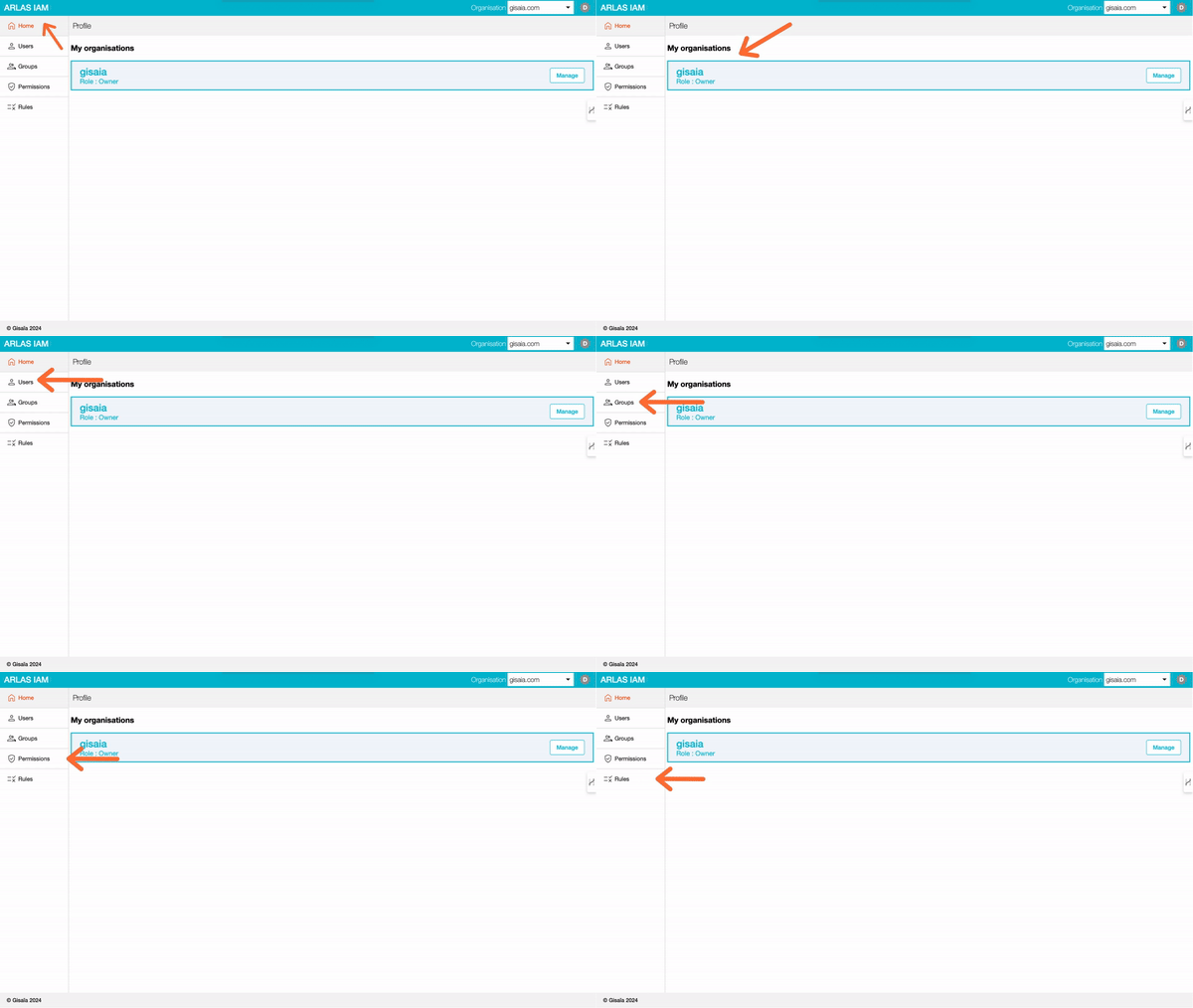
This article takes you through the functions within ARLAS-IAM that support effective user access and management. We’ll take you through some scenarios below on potential usage but to start you off, here are some definitions used in ARLAS-IAM.
DEFINITIONS
Organisation: This is an entity grouping people collaborating together, like a company or a university. By default an organisation is characterised by an internet domain name, like gisaia.com because it covers its users with their email address. An organisation can be created only by a user having its email address containing the internet domain name. An organisation has one or several designated owners.
An organisation owns data, referred to as a ‘Collection‘ in ARLAS. A Collection is a homogeneous dataset composed of json entries with location and temporal dimensions.
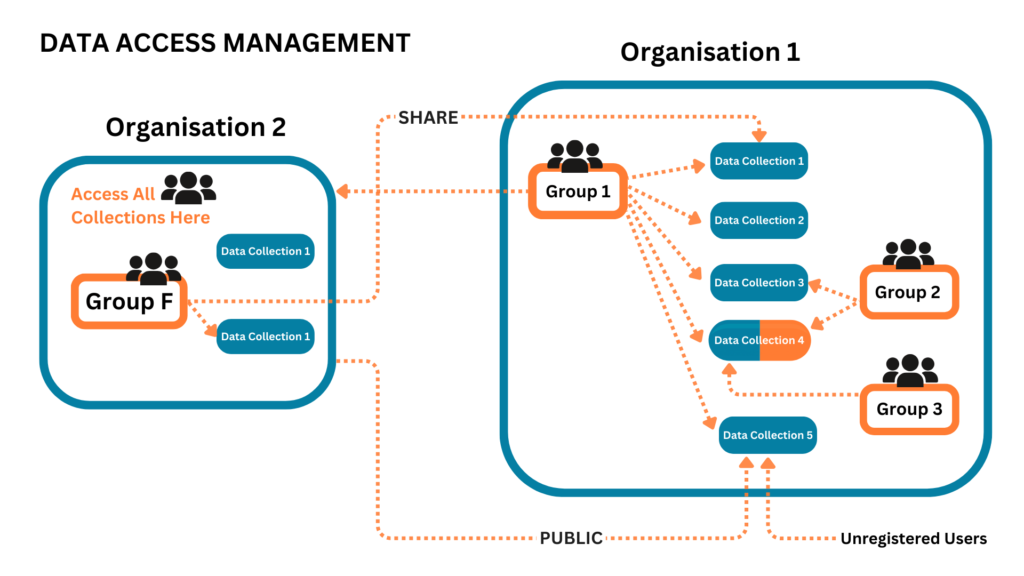
A collection belongs to one and only one organisation and can be shared as a “read only” permission to other organisations. An organisation can make their collection public. If marked as public, everyone sees it but can not alter it. An organisation may own several collections depending on the diversity of their projects.
To manage data access, the owners of the organisation decide which “Users” gain access to different data collection depending on which “Group” they belong to.
A “Group” is a set of “Users”. We use groups to share data collections. We also give a group a list of “Permissions”. A permission is a rule that defines what the group (and so the user who belongs to the group) can see : the collection, the fields in the collection, and which data with an ARLAS filter.
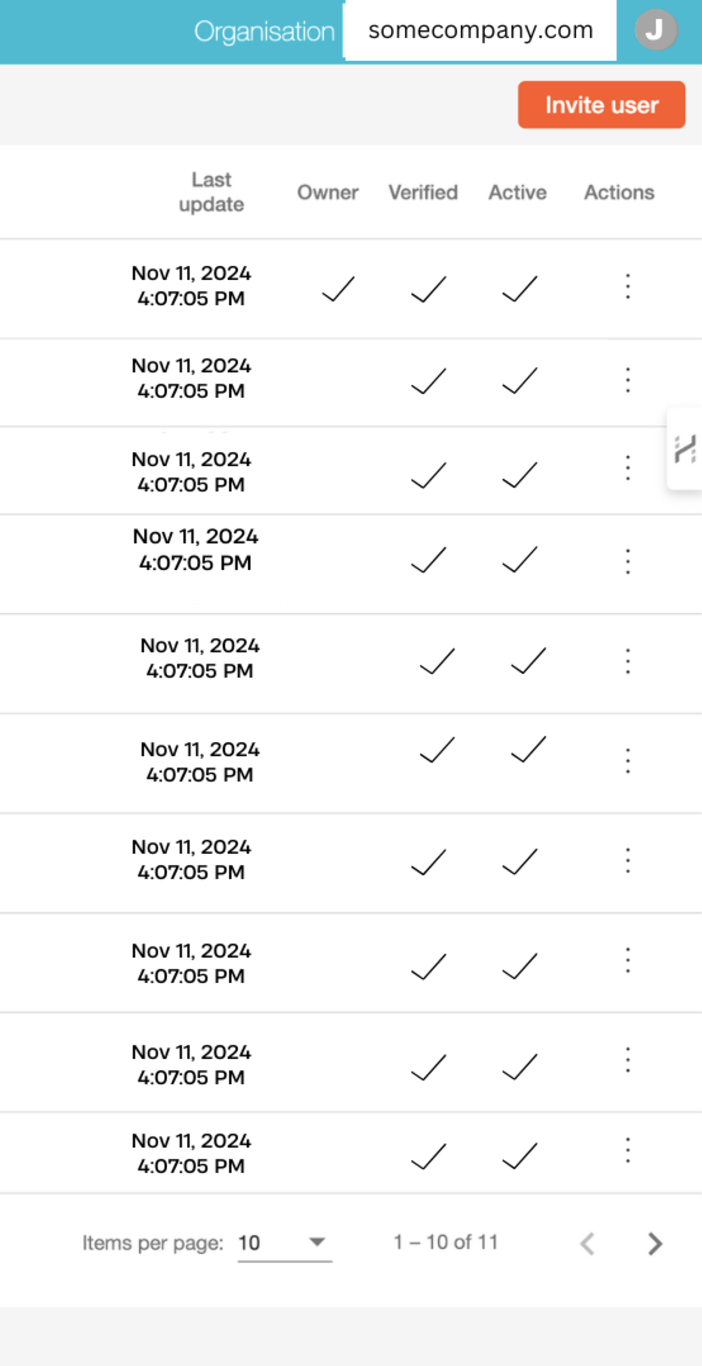
A User is a person that is identified on ARLAS by their email address. Users have Roles assigned based on their functions. They can belong to one or more organisations within ARLAS. These users are linked to roles and groups with different access levels and permissions. The owner invites users to join the organisation.
A Role is ascribed to a User telling them which functions are available to them for their organisation within ARLAS. There are four roles: User, Editor (labelled “Dataset” on ARLAS-IAM), Builder and Owner. A person can have multiple roles.
When creating the organisation, the Owner is the designated administrator, who then assigns roles.
An Editor manages data collections. They add new data, fill in information on the data and remove redundant collections.
A Builder determines how the data will be explored by configuring the dashboards.
When the data has been set, a User can then access the ARLAS Exploration Web User Interface; explore the data collection, run an analysis on data, download results or share results link with other users.
A person who is only assigned the User role can not edit the collection, build dashboards or access other admin roles. Finally under usage, the owner sets up Groups based on usage and permissions.
A Group has permission to access a collection of data. They may or may not be allowed to see a collection. It may be a partial or full view of the data contents.
ROLES AND DATA ACCESS POSSIBILITIES
In the age of data intelligence, security is of utter importance. Who can access your data? When and if they logged in? And are there irregularities with the way your accredited users access information? Our team carried these same questions into building the functions of account inventory in ARLAS-IAM and provide these options for you to share your data:
- Control Access within the same organisation; you have groups and you share with groups. Note: one group corresponds to “access all in the org”
- Share with a specific or several organisations; open to all from the selected organisation
- Open to the public: anyone can access the data collection
We came up with a company, “SomeCompany”, for demonstration purposes. Let’s take an example of this company’s usage of ARLAS-IAM. SomeCompany builds solutions for land monitoring and change detection. They signed up with Gisaia to use ARLAS-Cloud services to build their applications to provide insights to different stakeholders; policy makers, researchers, and even some business entities. Jane is in-charge of the database user management.
Assigning Roles
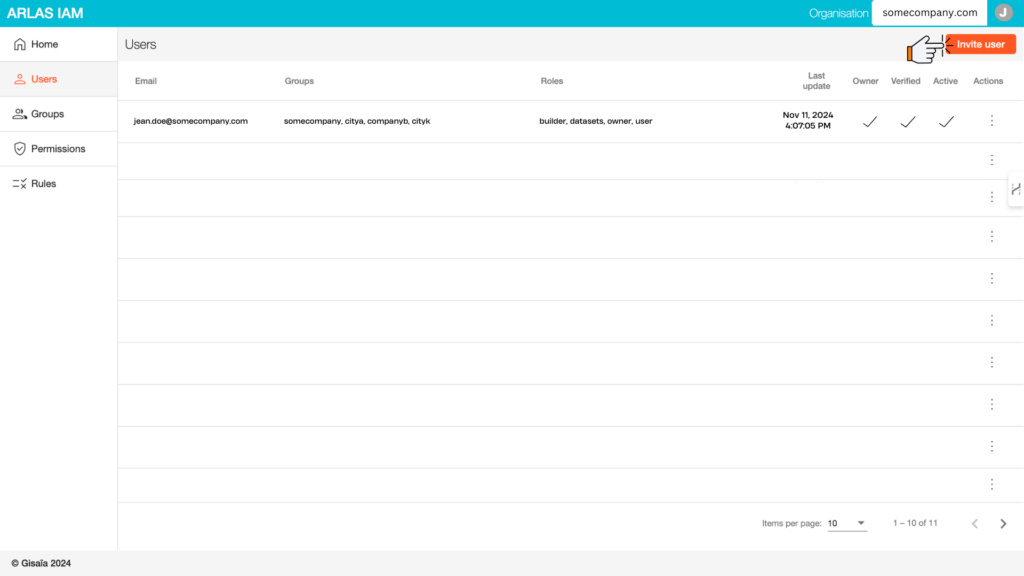
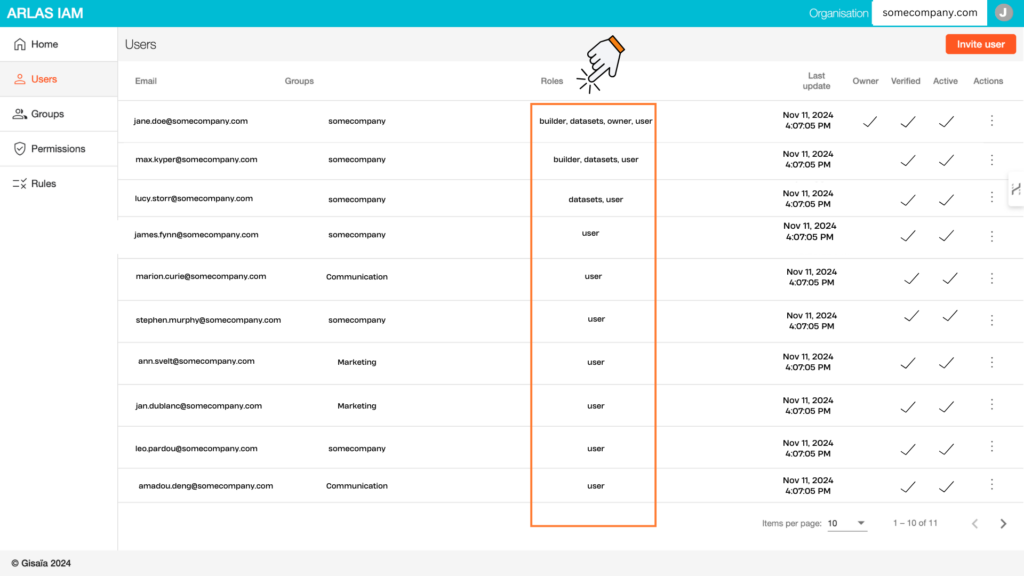
Jane is listed as the Organisation owner of SomeCompany and can therefore access ARLAS-IAM to add users and allocate them roles as defined in the second image below. Jane could designate herself or someone else to carry out multiple roles.
Max is allocated the role of Builder and User to access what he builds. He knows what aspects of the data are to be explored and sets up the right dashboard and Widgets. Once these are ready, Lucy who is now the designated “Dataset”, adds the data and makes sure that the rest of her team who are designated as users can now start exploring the data. The rest of the team as designated users.
Now, we can dive into the different ways that SomeCompany can manage data access with their team and external partners.
Managing Data Collections
Example 1: Control data access within the same organisation
By default, a data collection is private and only the owner and designated group can see it. Jane creates groups; SomeCompany, which is created by default by the system, Marketing and Communication. She adds her colleagues to the relevant groups. They can see all data collections under their organisation. Those assigned to Marketing or Communication groups also have permission to access insights from the data collections open to their groups.
Example 2: Share with a specific or several organisations
Jane’s colleagues want to grant access to their solutions to various clients from the different organisations that they work for or collaborate with.
They can provide access through different ways;
- Give partial access to a data collection: City A is an organisation that collaborates with SomeCompany on a project on land use. Jane creates a new group, “Land Policy” and invites users from the City A to join it. SomeCompany has nationwide insights on land use but as City A only needs to access data over their official boundaries. Jane masks part of the data collection on land use separating City A insights from the rest. She sets permission to access this collection over City A’s geographical zone to the “Land Policy” group. They can only see data insights over the area of interest. But, people from SomeCompany could access the entire collection because the filter is not applied to their groups.
- Open full collection access to an external organisation: SomeCompany has a specific product for land use evolution for real estate markets. It offers this service to Company B and others with similar needs. The data collection with these insights is labelled “Real Estate Evolution.” Jane creates a group and calls it “Real Estate Analysts” and adds users from diverse real estate companies. As there is no filter on this collection, all the permitted group members can access the whole collection on “Real Estate Evolution”.
Example 3: Open data to everyone
City K has commissioned SomeCompany to build them a solution for monitoring water levels for their locality. This is a service that City K wants to provide to different departments. Jane creates a data collection on “Water Levels” and makes it public. This collection is visible to City K users and its stakeholders who easily access it as they don’t need to be part of a group to access it. Other users outside City K can also view the insights by having the link to the data collection. No login required here.
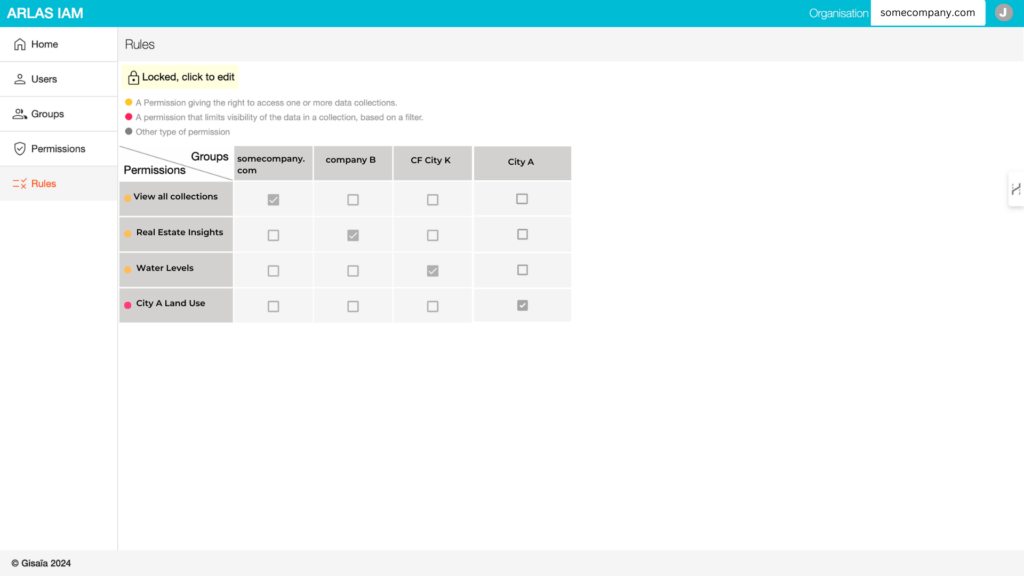
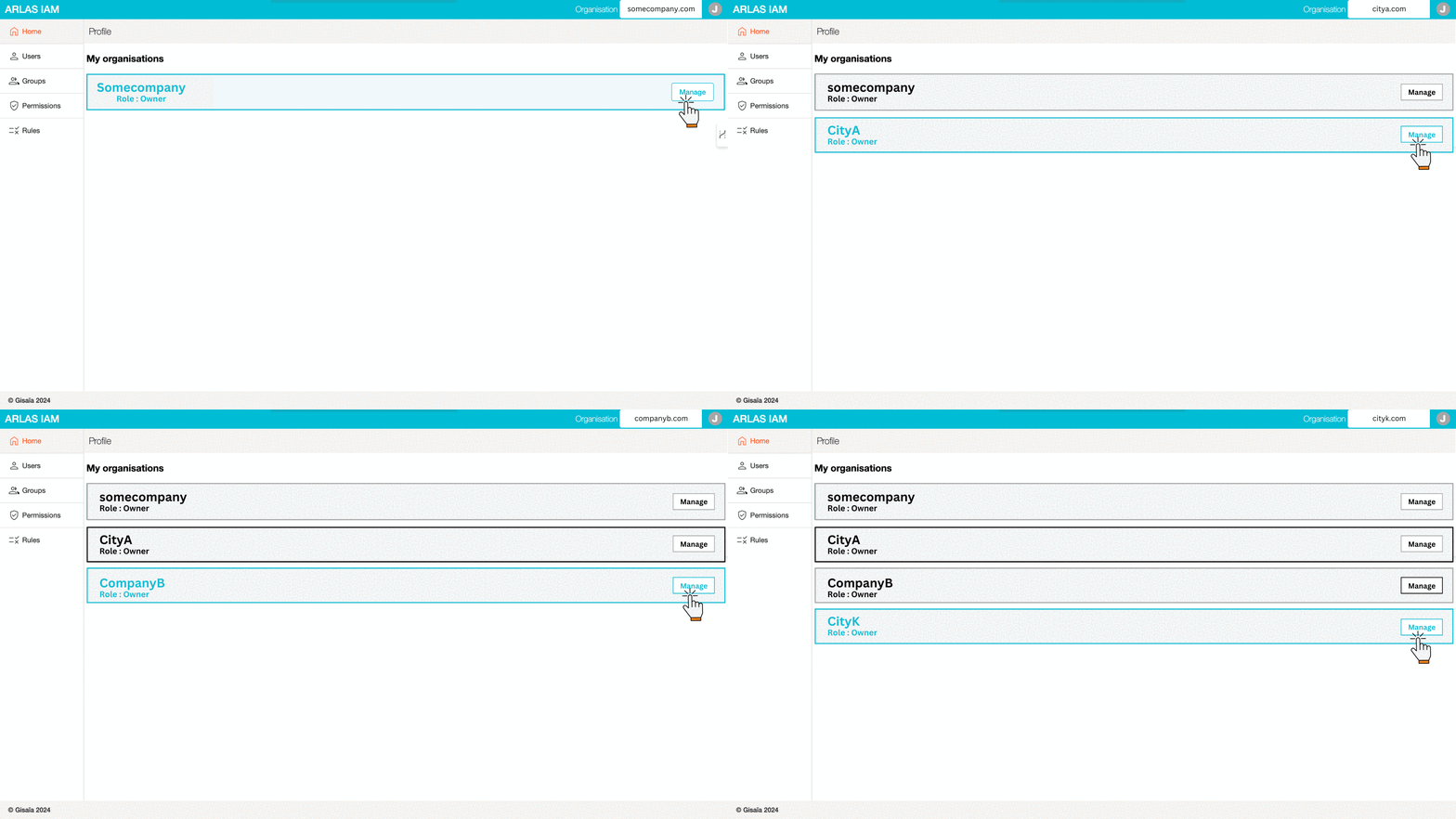
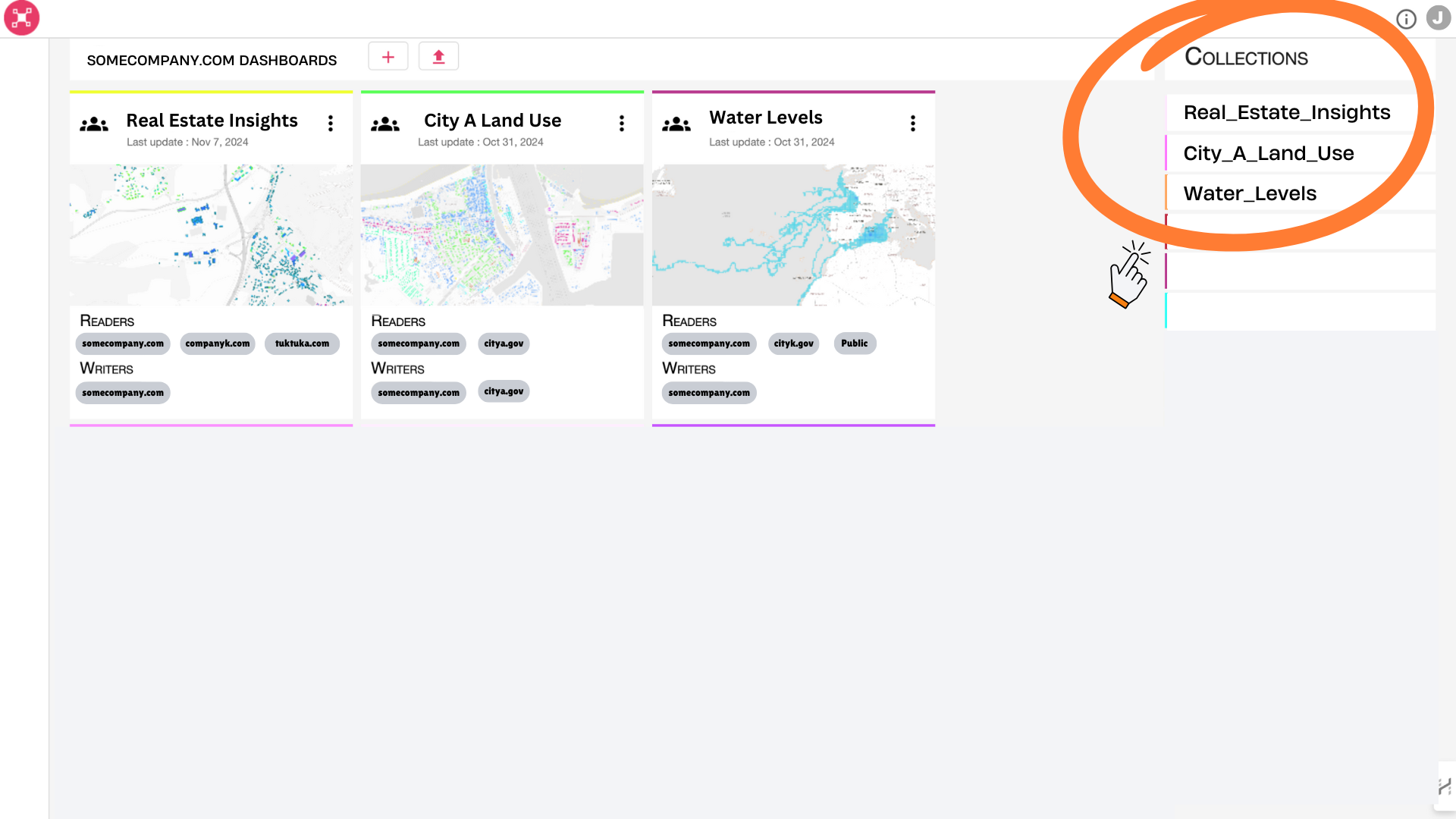
In this case, Jane makes sure that users’ access is limited to their permissions. This not only protects their data but also ensures that users focus on what is important to them. When viewing data on ARLAS hub, they only get to see the collections they are allowed to access. Like, SomeCompany users have access to all the collections as highlighted below.
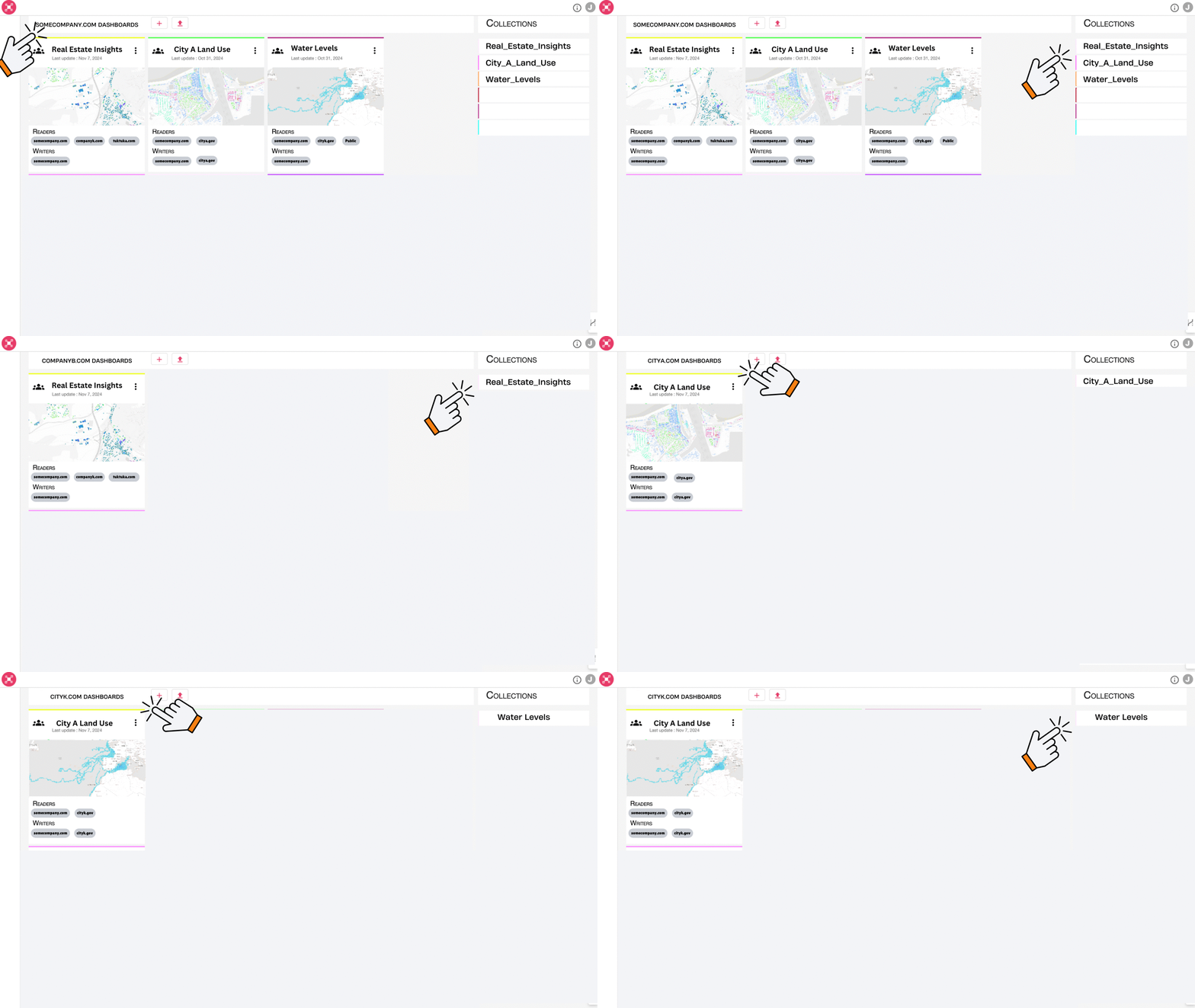
Each group only sees the collection that they are permitted to access.
Finally, ARLAS-IAM ensures that it has a reliable user log to track activities on their application.
ARLAS-IAM simplifies the account creation process for Jane. The data parameters —public or private collection — are defined, and the organisation domains provided, all permitted users who need to login can automatically create accounts or change passwords. Jane only gets a notification when it happens and can verify if all is fine.
TEST ARLAS
Are you new to ARLAS? Check out our public demos here and explore diverse data collections from different geospatial data sources highlighting ARLAS’ capacity in massive data visualisation, exploration and analysis. If you would like to test your own data on ARLAS, join this waitlist, and we will notify you in the coming weeks when we launch our free offer of ARLAS-Cloud accounts.
You can also get in touch with us to discuss your projects and together we can explore if ARLAS is the right fit for you.
Related Posts

Gisaia and Survintel Announce Strategic Partnership
Gisaia and Survintel Announce Strategic Partnership to Advance Ground Deformation Monitoring for Predictive Maintenance Gisaia and Survintel have entered into a strategic

WELCOME TO ARLAS-BUILDER
build interactive dashboards for Geospatial Analytics ARLAS-Builder is a comprehensive studio environment that we specifically designed for the creation and customisation