Explore Machine Learning Predictions with ARLAS
Interactive Visualisations and Exploring
Geospatial Data Science ML Prediction Results
Find a reliable tool to Explore Your ML Predictions
Our data science team added the Xview dataset in ARLAS. This is a training set with manually annotated open data used as reference. This dataset contains images from complex scenes around the world, annotated using bounding boxes. The Xview challenge aims to apply computer vision to the growing amount of available imagery from space. The goal is to understand the visual world in new ways and address a range of key applications.
We use this dataset to demonstrate how easily ARLAS helps you explore the results of a prediction algorithm and share the visualised outcome.
Transform complex datasets into clear, concise and accessible visualisations
Where location and spatial relationships are important, data visualisation is an indispensable skill. It helps geospatial data scientists to share their findings effectively to decision-makers, stakeholders, and the general public. By creating maps, charts, and other visual representations of geospatial data, data scientists can bridge the gap between raw data and meaningful insights, facilitating informed decision-making and problem-solving.
The existing tools available to geo data scientists are not sufficient to support their need to effectively communicate and share their results and discoveries. Even if data scientists are used to plot graphs with tools like Jupyter notebooks and Matplotlib, it is not that easy to create interactive dashboards with options to filter on multiple datafields.
There are also challenges that come with geospatial big data volumetry. And, when the number of elements to display are massive, the classic tools perform poorly, forcing data scientists to manually compute data aggregations. Also, sharing complex dashboards can be challenging and require deployments that data scientists prefer to avoid.
This lack of adequate tools often forces geospatial data scientists to take on the extra task of building custom dashboards from the ground up, solely for the purpose of showcasing their data findings in a comprehensible manner. This additional responsibility can be time-consuming and divert valuable resources away from core data processing tasks.
Showcase The End Results To Technical and Non-Technical Audiences
Using a powerful tool to present your results will help you bridge the gap between the results produced by data scientists and the final products required by end-users. You can concentrate on showcasing the end results with a vision on what the end-user product will look like.
Here, we highlight ARLAS’ flair in supporting geospatial data scientists in their efforts to highlight valuable insights from geo big data. We will provide a demonstration of how ARLAS can be used to thoroughly explore and analyze the outcomes generated by a prediction algorithm. We will delve into the visualisation power of ARLAS and show how it helps data scientists to share their work with non-technical audiences, to interpret and understand complex prediction results.
Explore Your ML Experiments Results At Scale
ARLAS provides a comprehensive understanding of your machine learning model’s results, allowing you to interact with all data fields regardless of the dataset’s size. By providing interaction with all fields, ARLAS helps you to explore relationships, detect patterns, and uncover insights that might be hidden in large and complex datasets.
The dashboards in ARLAS provide insights into the clarity of your predictions results. Simply generate the predictions and input the data into ARLAS to share them with your team and if ready, potential users.
We ingested the 600k XView Dataset detected objects (object identifier, source image identifier, object type, bbox geometry, timestamp…) in ARLAS and created a dashboard to explore those results.
Below are three examples highlighting how ARLAS supports geospatial data scientists to get clarity and share insights from their ML prediction results.
Point #1
Geo distribution of detected object: quickly see where you detected objects
ARLAS allows you to interactively compute map aggregations that refine dynamically with zoom level. The density map layer provides an instant visualization of object locations.
At the bottom of the application, a timeline offers an aggregated view of when objects were detected. On the left, an overview of object types is displayed, while on the right, a preview of corresponding images is available.

As you zoom in on an area, the density map progressively refines until individual object shapes (bbox geometry) become visible. You can also apply map filters, such as circular selection, to focus on specific locations.

Further zooming reveals objects color-coded by type, which are displayed directly on the map.
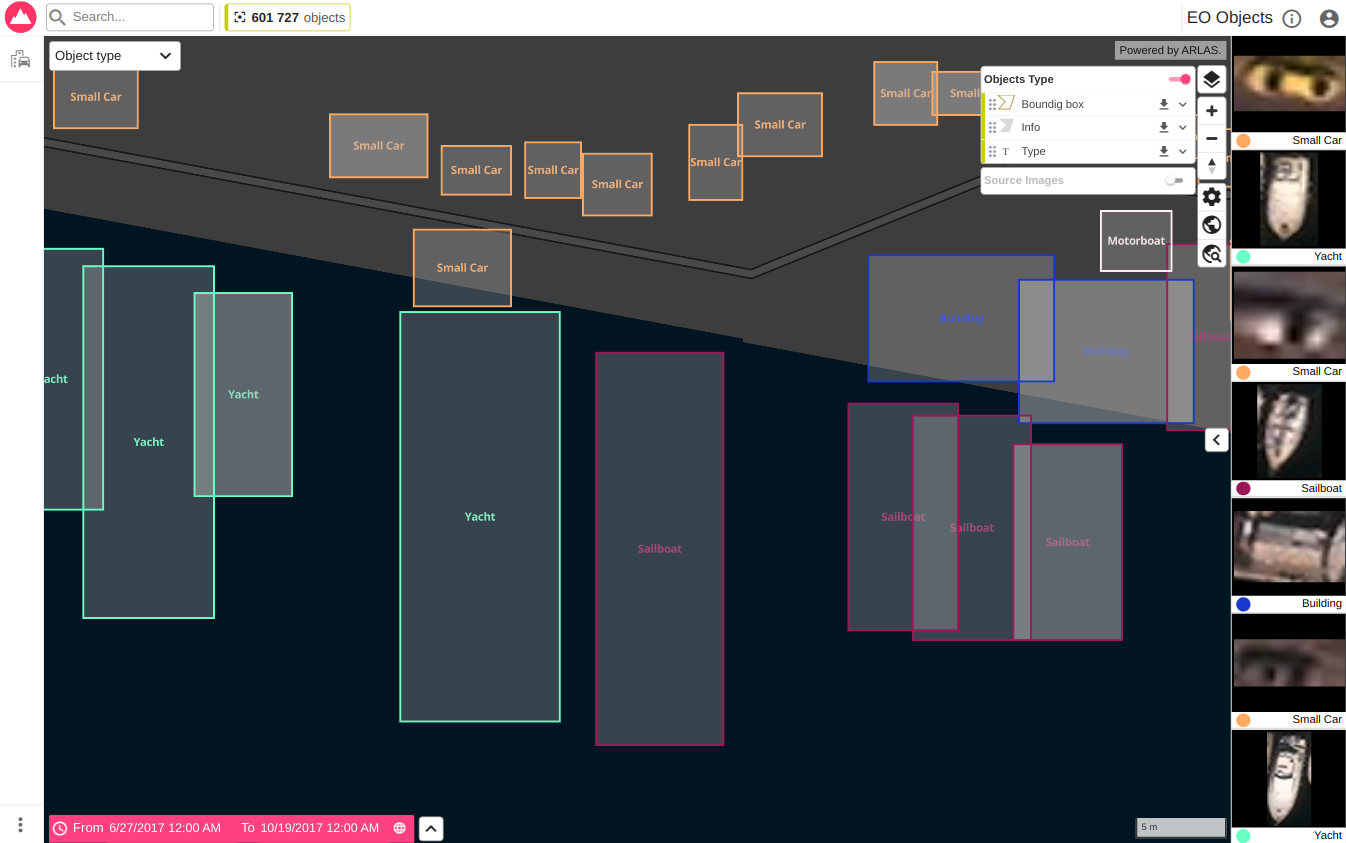
Here you notice that you can easily change the basemap to better align with your data.
Check out our short video on how to change basemap layers .
Point #2
Focus on certain types (planes)
The image below highlights only planes and their global distribution.
On the left-side widget panel, you can observe the distribution of different object types and apply filters to focus on specific ones. Filtering by plane type instantly updates the map, showing their locations.

By zooming in, you get a more detailed view of where most planes have been detected.

A further zoom reveals their exact positions. The corresponding images are displayed on the right panel, which can be expanded to show more images.

Once again, the basemap has been adjusted, as demonstrated here.
Point #3
Visualisation of images
Now, let’s focus on the image visualization tool on the right side of the dashboard.
ARLAS seamlessly interacts with image archives, displaying images without requiring local storage, thus reducing data duplication and keeping the application lightweight.
The image metadata (identifier, bbox extent, type, timestamp…) are ingested in ARLAS. This allows the system to retrieve and display images as thumbnails or in a larger format without storing the actual image.
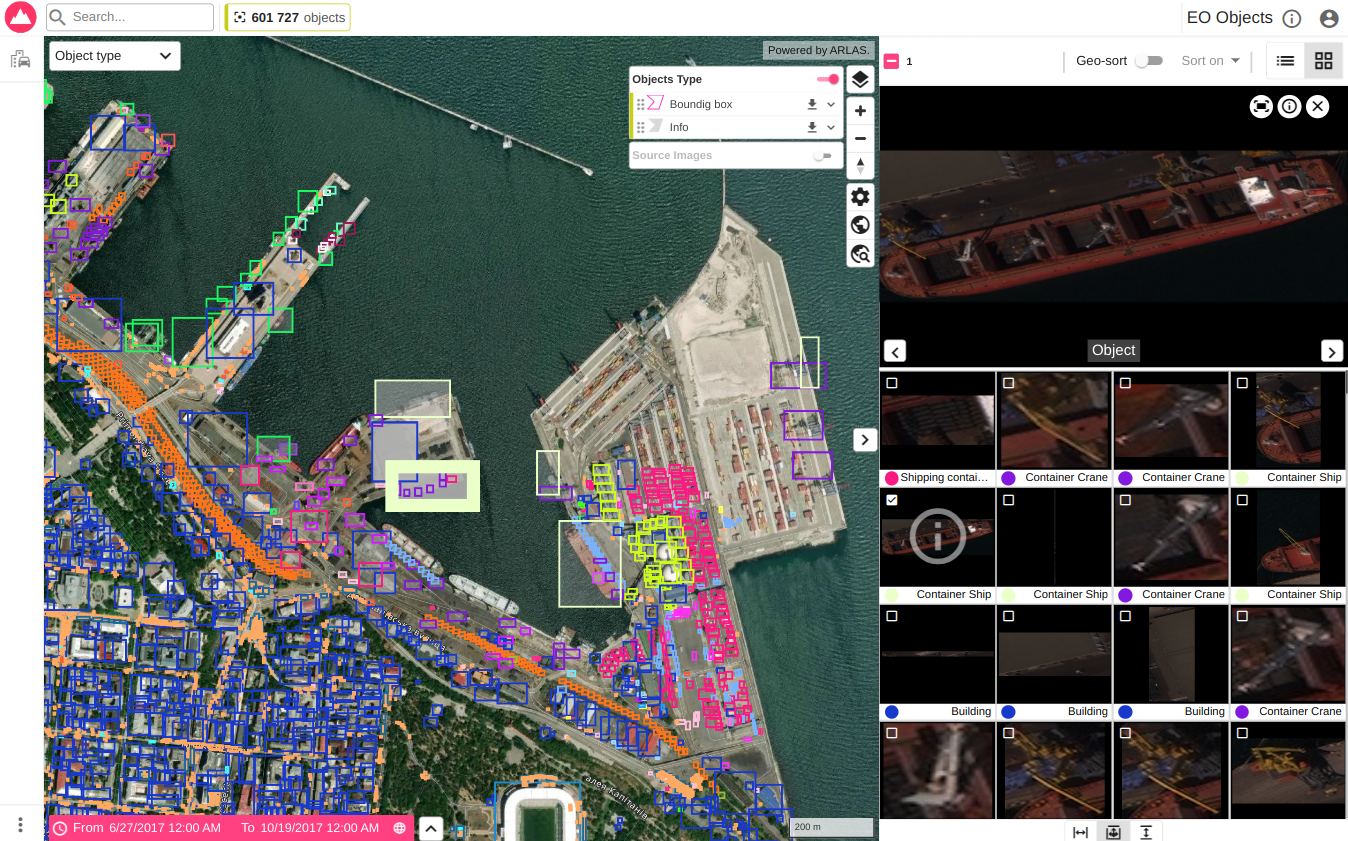
An object can reference multiple images. Here the cropped object itself and the entire Earth Observation image where it has been detected.

The ARLAS image viewer lets you browse these images directly within the application. Additionally, ARLAS offers a download module to retrieve image files.
Bonus Point: Share your results with your team in a “ready-for-production” tool

ARLAS makes it easy to securely share dashboard access with your team or designated users as explained here.
Get Started with ARLAS-Cloud
ARLAS gives you an in-depth view of how your ML prediction performs. It lets you interact with all the fields of your data irrespective of your dataset’s volume.
Easily exploring your ML predictions results allows you to focus on either improving the models or envisioning the best ways to share the patterns that would be otherwise impossible to discern, with others who may not be familiar with data science; decision-makers or other actors that use the insights that you have extracted to take concrete actions.
You can start exploring your ML prediction results right away on ARLAS-Cloud which also allows you to collaborate smoothly. Get in touch with us and we will help you set up an account. Register for a free account to test ARLAS capabilities.
Related Posts

Gisaia and Survintel Announce Strategic Partnership
Gisaia and Survintel Announce Strategic Partnership to Advance Ground Deformation Monitoring for Predictive Maintenance Gisaia and Survintel have entered into a strategic

WELCOME TO ARLAS-BUILDER
build interactive dashboards for Geospatial Analytics ARLAS-Builder is a comprehensive studio environment that we specifically designed for the creation and customisation